What Is OpenAI Dots? Dots vs Muse vs Grok Bot vs OpenClaw
OpenAI Dots are always-on personal AI agents that live inside ChatGPT. OpenAI unveiled them at DevDay on September 29, 2026, as the first product of the show. A Dot runs on GPT-6 Astra in its own cloud computer, connects to more than 4,000 apps, keeps working after you close ChatGPT, and messages you when something needs you.
That makes three big personal agents in seven weeks. xAI shipped Grok Bot on August 11, Meta shipped Muse on September 8, and now OpenAI has Dots. All three chase the same idea: the always-on agent that OpenClaw made popular earlier this year. OpenAI even hired OpenClaw's creator in February.
This guide explains what OpenAI Dots can do, what it costs and where it falls short, then compares Dots, Muse, Grok Bot and OpenClaw side by side.
Key takeaways
- OpenAI Dots run on GPT-6 Astra, each on its own cloud computer, with 4,000+ apps. You reach your Dot in ChatGPT (text or voice), Slack or Microsoft Teams; texting and phone calls are coming. Your first Dot is included with ChatGPT Pro (from $100/month) or Business Premium ($125 per seat/month). Pro users in the EU, UK and Switzerland are excluded at launch.
- Meta Muse is free to start ($20 and $100 plans), but only in the US and Canada. Grok Bot comes bundled with SuperGrok and Cursor plans, and all your bots share one cloud computer.
- All three are closed and locked to their maker's model. OpenClaw is open source, works with GPT, Claude, Gemini or local models, and runs anywhere.
- Want OpenClaw without running a server? open-claw.org gives you a private OpenClaw in the cloud, with credits for GPT-6 Astra, Claude Opus 5 and Gemini included, from $39.90/month.
OpenAI Dots vs Muse vs Grok Bot vs OpenClaw at a glance
| OpenAI Dots | Meta Muse | Grok Bot (xAI) | OpenClaw | |
|---|---|---|---|---|
| Launched | September 29, 2026 | September 8, 2026 | August 11, 2026 | November 2025 (as Clawdbot) |
| Model | GPT-6 Astra only | Muse Spark only | xAI's Grok models, no picker | Any: GPT, Claude, Gemini, DeepSeek, local models and more |
| Where it runs | Its own cloud computer at OpenAI | A private VM in Meta's cloud | One cloud computer shared by all your bots | Your computer, your server or a hosted instance |
| Where you talk to it | ChatGPT (text and voice), Slack, Teams; SMS and phone coming | Muse app, muse.ai, Mac app, WhatsApp | Grok Bot app for desktop and mobile | WhatsApp, Telegram, Slack, Discord, Signal and 20+ more |
| Apps and tools | 4,000+ ChatGPT apps and plugins | Meta-reviewed connectors | Signs in to your sites like a person; learns by watching you | Skills and plugins you install or write |
| Price to start | ChatGPT Pro (from $100/mo) or Business Premium ($125/seat/mo) | Free; $20 and $100 plans | Bundled with SuperGrok and Cursor plans (from $20/mo) | Free software; hosted from $39.90/mo with $40 of API credits |
| Availability | Pro excludes the EU, UK and Switzerland | US and Canada | Wherever SuperGrok or Cursor is sold | Anywhere |
| Open source | No | No | No | Yes (MIT) |
What is OpenAI Dots?
A Dot is a personal agent that works on your goals in the background. OpenAI's pitch is that you delegate the way you would to a sharp chief of staff: you describe what you want done, and the Dot keeps chipping away at it every hour of the day. On stage, Sam Altman called it "an AI helper that always has your back".
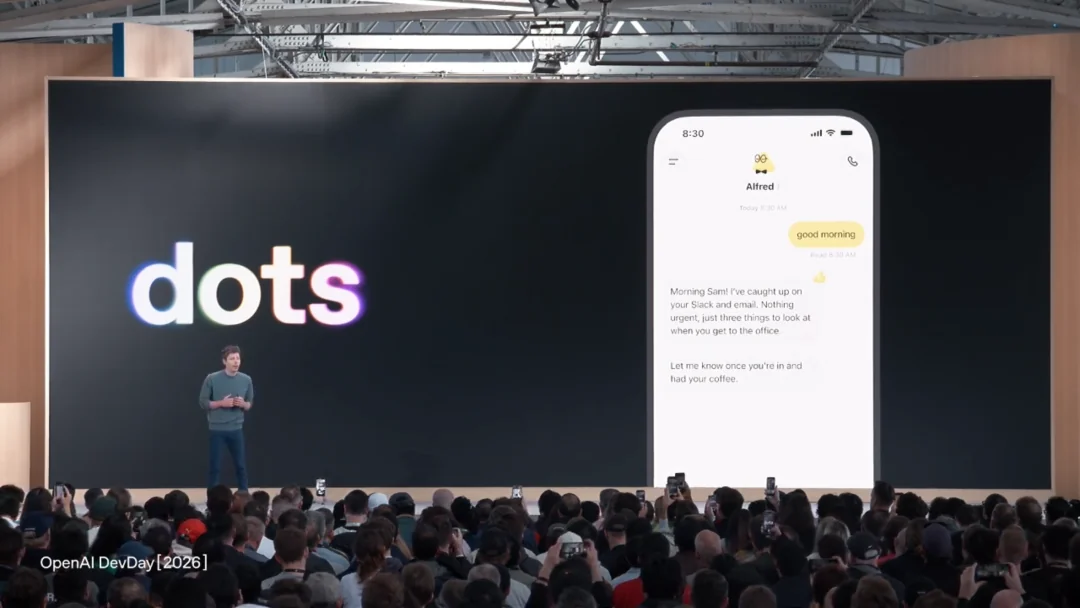 Dots on stage at DevDay 2026. The demo Dot, "Alfred", has already read Slack and email and flags three things to look at. (Image: OpenAI DevDay livestream)
Here's what a Dot can do today:
- Work on its own computer. Each Dot gets a cloud computer and browser that you can open at any time to watch what it's doing. With your permission, it can also work on your own laptop.
- Use your apps. It inherits the apps you've already connected to ChatGPT. OpenAI says more than 4,000 apps work with Dots, including Gmail, Google Calendar, Slack, GitHub and Notion.
- Keep going after you leave. A Dot keeps working when the ChatGPT window is closed, sends progress updates, and pings you only when something needs your review.
- Learn how you work. It learns what's worth interrupting you for and which decisions you're happy to let it make.
- Follow you across channels. You can message or talk to your Dot in ChatGPT on desktop, web and mobile, or reach it in Slack and Microsoft Teams, and the context comes with it. OpenAI says texting and phone calls are next.
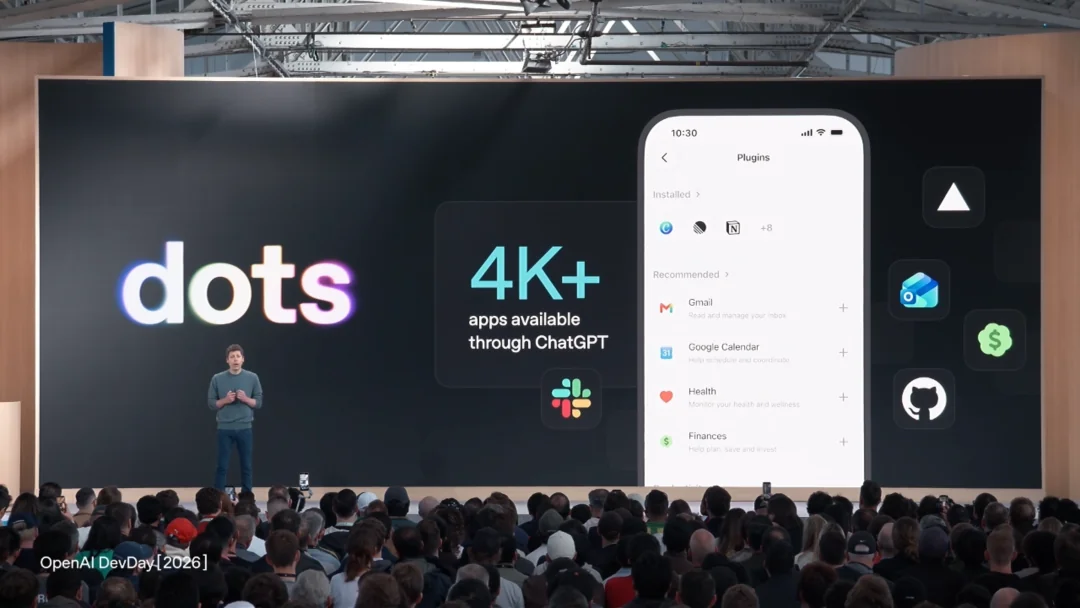 Dots use the same plugins you connect in ChatGPT. (Image: OpenAI DevDay livestream)
Setup is short: open your Dot in the ChatGPT desktop app or a desktop browser, give it a name, connect your apps, and it starts working. After that you can keep talking to it from the ChatGPT mobile app.
Dots texts you, and waits for a yes
The most human part of the demo was a Dot named Todd texting its user about dinner. Todd noticed "Launch Prep" was running through dinner, pulled two delivery options with full cart quotes, and waited. The reply was "Let's go with Mexican. Don't order yet", and Todd didn't order.
 OpenAI's texting demo. Text messages and phone calls are announced, not yet live for everyone. (Image: OpenAI)
That demo shows how OpenAI thinks about control. Out of the box:
- Built-in rules decide when a Dot may act alone and when it must ask.
- Custom rules let you allow, block or require approval for specific actions.
- Auto-review checks any step that could touch your accounts or share information.
- Proactive research is read-only. When a Dot digs around on its own, it can read your connected data but can't send messages, change content or drive a browser.
- Sensitive actions stay with you. Changing a password always goes back to you, and a Dot can use saved passwords without the model ever seeing them.
OpenAI is also candid that Dots "can still make mistakes" and that you should review anything consequential. The company has also held back GPT-6.1 Astra, the next version of the model, because it didn't yet meet OpenAI's bar for staying within scope and authorization.
OpenAI Dots pricing and availability
| What you get | |
|---|---|
| Who can use it | ChatGPT Pro and Business Premium, rolling out from September 29; Enterprise, Edu and Healthcare as a beta that admins switch on |
| Price | Your first Dot is included in your plan. ChatGPT Pro starts at $100/month; Business Premium seats are $125/month ($100 billed annually) |
| Usage | Chatting with your Dot doesn't count against your ChatGPT limits, and the first month comes with extended limits. Tasks it starts in Codex or ChatGPT Work count as usual |
| More Dots | Coming later for a fixed monthly fee, along with options to make a Dot faster or give it more work per month. Prices aren't announced |
| Where | "Eligible markets" only. Pro users in the EEA, UK and Switzerland are excluded at launch, and users under 18 can't use Dots |
For companies, OpenAI is piloting Specialist Dots: organization-level agents for accounting, email marketing, legal analysis and ticket resolution that share the company's goals, context and feedback. Teams of Dots working together are on the roadmap too.
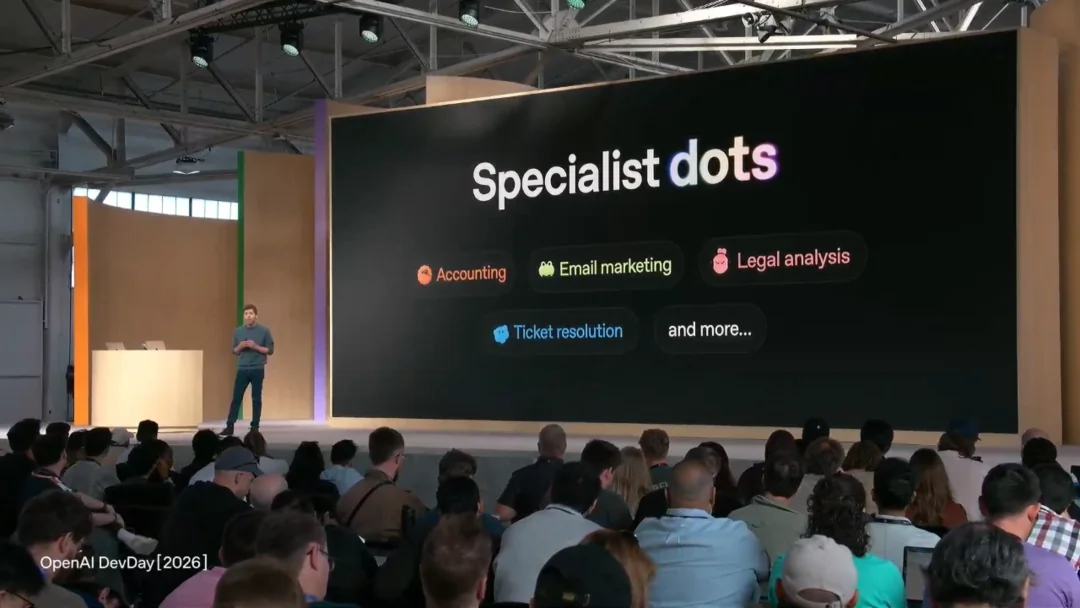 Specialist Dots are in a limited enterprise pilot. (Image: OpenAI DevDay livestream)
The dot.com twist
On the evening of the launch, people noticed that dot.com now redirects to x.ai/bot, the Grok Bot page. Whois records show the domain changed hands in July, and xAI hasn't commented. Whether it was a prank or a lucky coincidence, it put a rival agent one typo away from OpenAI's launch.
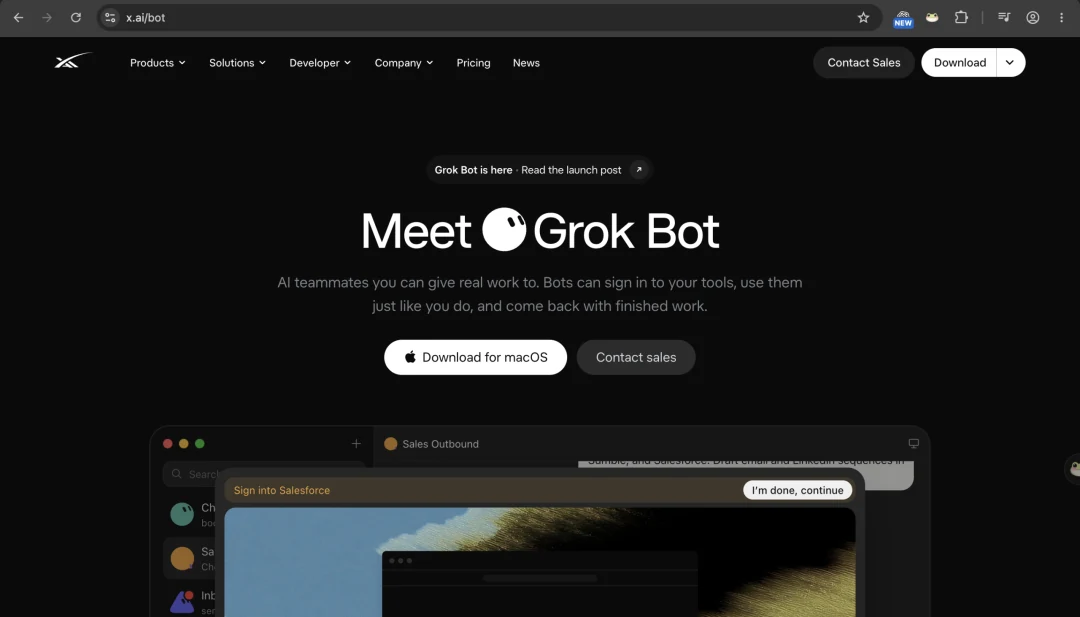 Type dot.com into a browser and you land here. (Image: x.ai)
Muse and Grok Bot in one minute
Meta Muse
Muse is Meta's personal agent, powered by Meta's own Muse Spark model and running in a private VM in Meta's cloud. You use it in the Muse app, at muse.ai, in a Mac app or on WhatsApp. It's strong at errands: it books travel, fills in forms, phones US businesses and checks out through Link by Stripe with partners like Walmart and Best Buy. It's free to start, with $20 and $100 monthly plans, and within ten days it hit #1 on the US App Store, ahead of ChatGPT. The catches: it's US and Canada only, and Meta trains on your Muse chats unless you opt out. We covered it in depth in Muse AI vs OpenClaw.
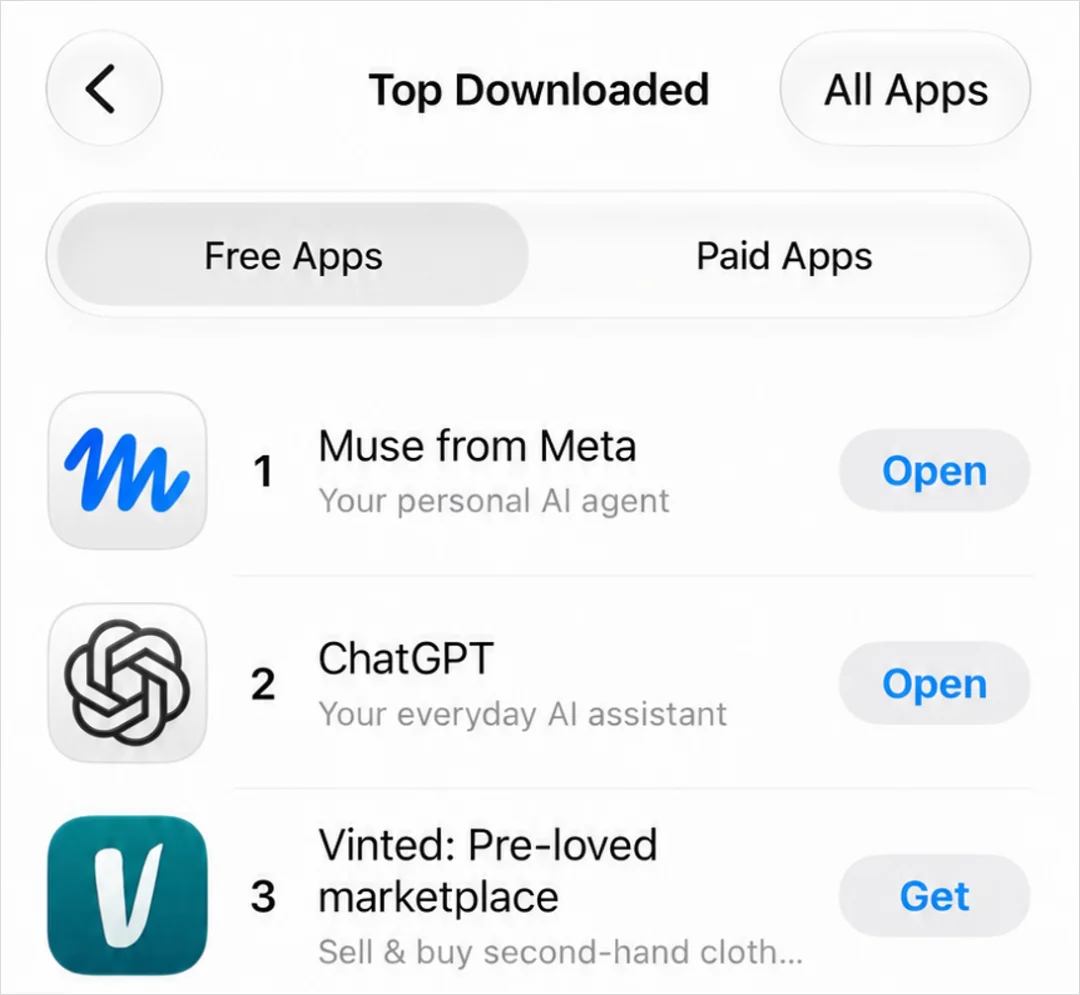 Muse passed ChatGPT at the top of the App Store's free charts.
xAI Grok Bot
Grok Bot is xAI's take, pitched as "AI teammates you can give real work to". Your bots get a persistent cloud computer with a real browser, file system and terminal, sign in to your tools the way a person would, and finish multi-step jobs while you're away. Its standout trick is teach a task: record yourself doing a workflow once, and the bot turns it into a routine. It isn't sold on its own; it comes with paid SuperGrok and Cursor plans (since SpaceX bought Cursor in August, Grok Bot and Cursor share one account and billing). Two caveats: there's no model picker, and all your bots share one computer. xAI's own docs warn not to use separate bots as a security boundary, because logins and files on that machine are available to all of them.
Why they all look like OpenClaw
None of this is a coincidence. OpenClaw is the open-source personal agent that took over GitHub this year, with about 390,000 stars. It showed what people want from an agent: always on, reachable from your chat app, with a real browser and shell, and memory that builds up over time.
- In February 2026, OpenClaw's creator Peter Steinberger joined OpenAI "to bring agents to everyone", and OpenClaw moved to an independent, open foundation.
- In September, Nat Friedman of Meta Superintelligence Labs said Muse was built from scratch but heavily inspired by OpenClaw, and that the goal was an OpenClaw-like agent that is safe, easy and able to scale to billions of people.
- Grok Bot's pitch of always-on "teammates" in their own computer is the same shape again.
So the fair way to read DevDay is this: three of the biggest AI companies have each built their own walled-garden version of OpenClaw. Each one is polished, each one is locked to its maker's model and cloud, and each one decides where you're allowed to use it.
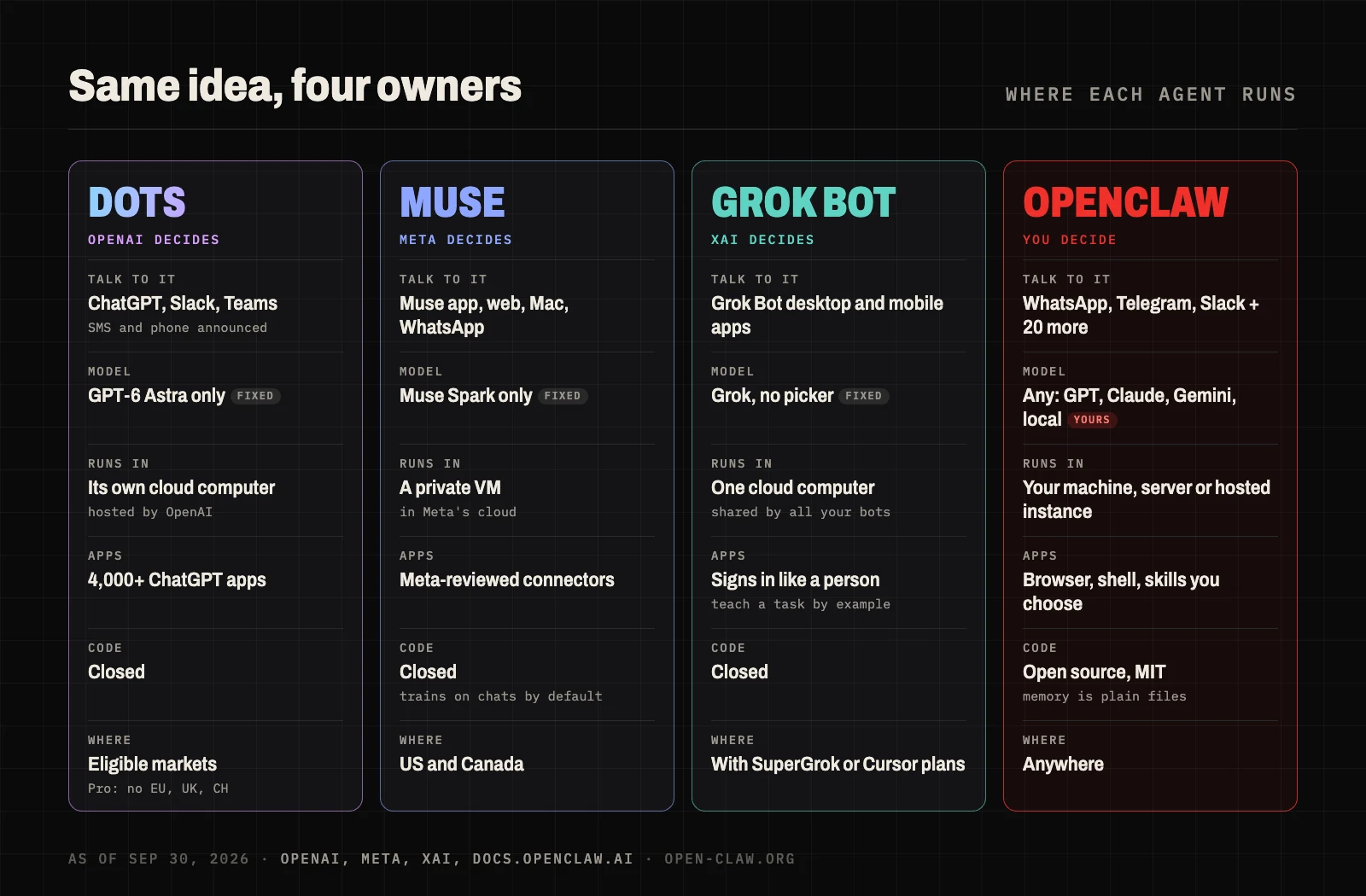 Same idea, four owners. Only one of them lets you swap the model or take the agent with you.
OpenAI Dots vs Muse vs Grok Bot vs OpenClaw: head-to-head
1. Getting started: Dots, Muse and Grok Bot
All three big-company agents take minutes: sign in, name your agent and connect your apps. Self-hosted OpenClaw means an always-on machine, Node.js, API keys and pairing your chat apps. A hosted OpenClaw closes most of that gap.
2. Apps and integrations: Dots wins
This is Dots' biggest advantage. It inherits ChatGPT's 4,000+ apps and plugins, plus Slack and Teams, which matters if your work lives in SaaS tools. Grok Bot takes a different route and simply signs in to websites like a person, which works even where there's no API. Muse has fewer, Meta-reviewed connectors. OpenClaw has a browser, a shell and a growing library of skills, but you pick and install them yourself.
3. Models: OpenClaw wins
Dots only run GPT. Muse only runs Muse Spark. Grok Bot only runs Grok, with no picker. OpenClaw lets you choose per job: GPT-6 Astra for hard problems, Claude Opus 5 for writing and code, Gemini 3.8 Flash for cheap check-ins, or a local model for sensitive files. When a better model ships next month, you switch in a minute.
4. Safety and control: Dots leads the big three
OpenAI has shipped the most complete control panel so far: custom allow/block/approve rules, auto-review, read-only proactive research and password handling the model can't see. Muse has a separate "Sentinel" agent that approves what leaves its VM. Grok Bot asks before sensitive steps but shares one computer across all your bots. With OpenClaw, you set the rules and the sandbox, which is more power and more responsibility.
5. Where you can use it: OpenClaw wins
Muse is US and Canada only. Dots on ChatGPT Pro exclude the EU, UK and Switzerland at launch. Grok Bot is limited to wherever SuperGrok or Cursor subscriptions are sold. OpenClaw works anywhere and talks to you on WhatsApp, Telegram, Slack, Discord, Signal, iMessage, Feishu and more.
6. Price: Muse is cheapest, Dots is priciest
Muse has a free tier. Grok Bot comes with paid SuperGrok and Cursor plans, starting at $20 a month. Hosted OpenClaw starts at $39.90 a month with $40 of model credits included. Dots need ChatGPT Pro at $100 a month or more, or a $125 Business Premium seat.
7. Ownership and lock-in: OpenClaw wins
Dots, Muse and Grok Bot are closed. Your agent, its memory and its history live on their servers, under their terms. OpenClaw is MIT-licensed, and its memory is plain Markdown files you can read, edit, back up and move. If you leave a hosted OpenClaw, you can export everything and run it yourself.
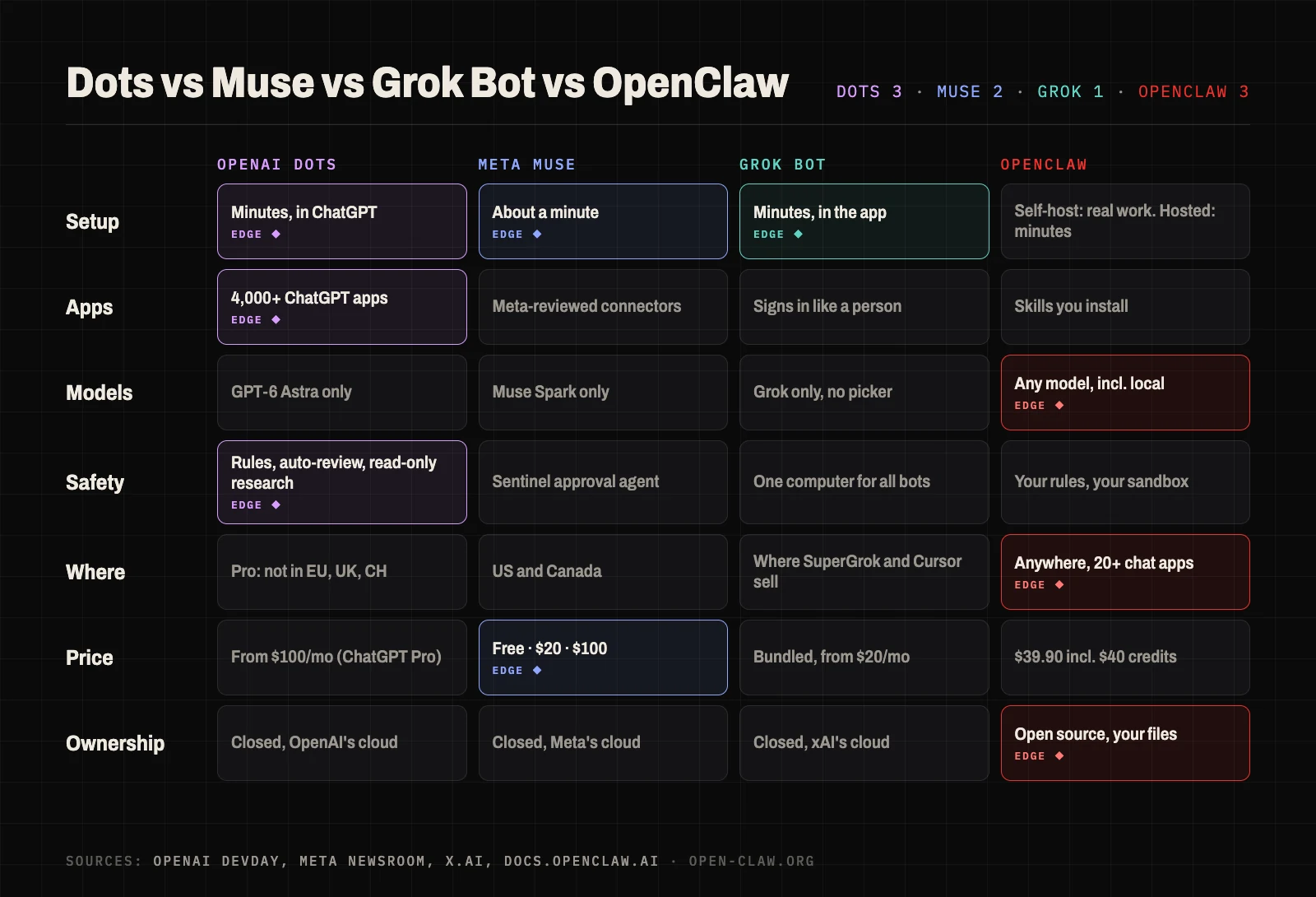 Dots win on apps and polish. OpenClaw wins wherever choice and ownership matter.
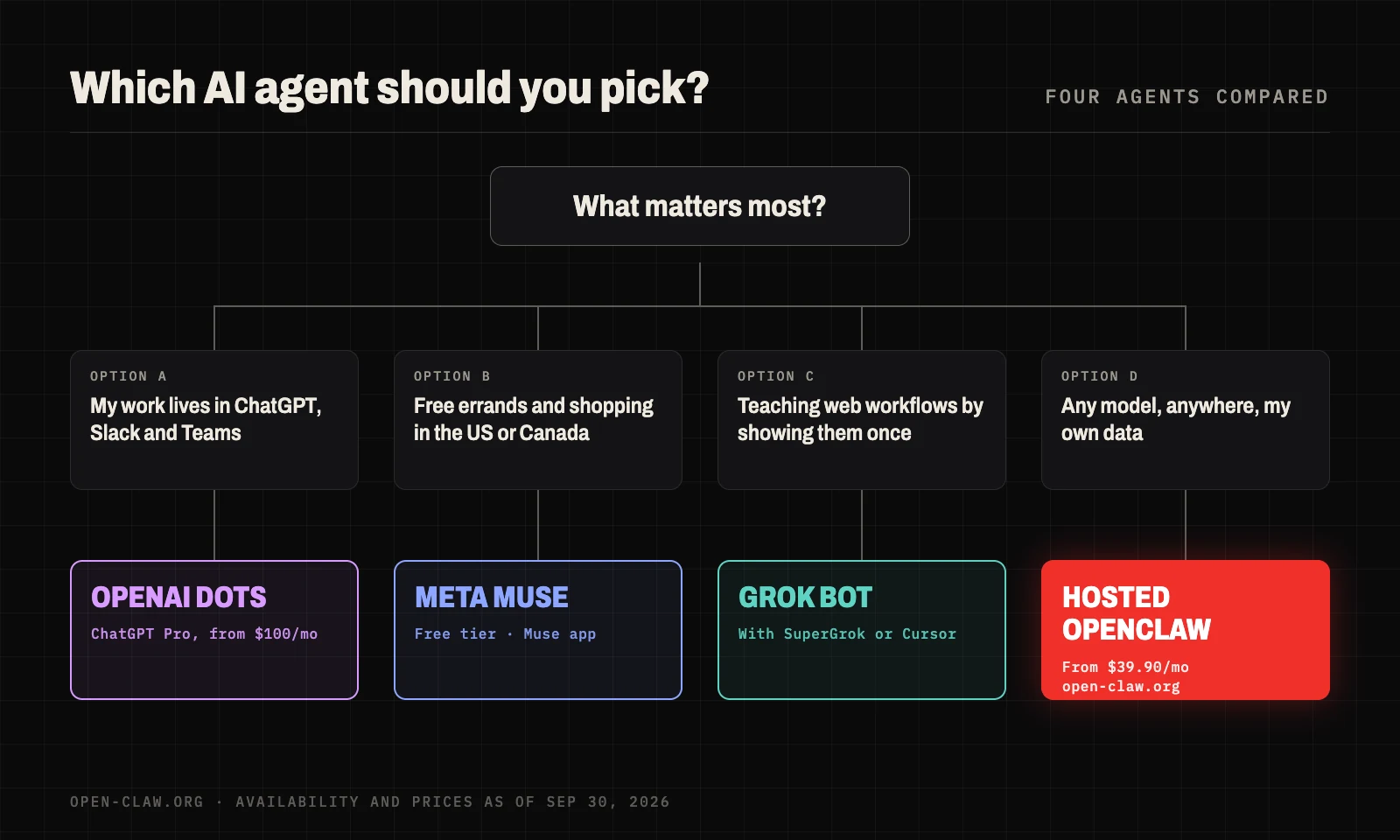
Which personal AI agent should you choose?
Choose OpenAI Dots if:
- You already pay for ChatGPT Pro or Business Premium, and you're outside the EU, UK and Switzerland.
- Your work runs through Slack, Teams, Gmail and other SaaS apps that ChatGPT already connects to.
- You want the most mature approval rules and don't need to pick the model.
Choose Meta Muse if: you're in the US or Canada, want a free agent for errands and shopping, and you're fine with Meta holding your data.
Choose Grok Bot if: you already pay for SuperGrok or Cursor, and your workflows live on websites with no API that you'd rather teach once by example.
Choose OpenClaw if:
- You want to pick, and switch, the model: GPT, Claude, Gemini or local.
- You live outside the US, or outside ChatGPT's eligible markets.
- You want your agent's memory and files somewhere you control, with no lock-in.
- You want a capable agent for well under $100 a month.
Get OpenClaw in the cloud, with the model behind Dots included
The main reason to pick a big-company agent over OpenClaw is setup. open-claw.org takes that away. We run the open-source OpenClaw for you, and every subscriber gets a dedicated, isolated instance in a cloud sandbox, always on, like a Dot. You don't need a server, a terminal or your own API keys.
- GPT-6 Astra, without ChatGPT Pro. Plans include API credits for GPT-6 Astra, the model behind Dots, plus GPT-5.6, Claude Opus 5 and Gemini 3.8 Flash, billed at official rates. Switch models whenever you like.
- Ready in minutes. Click Create and initialize, then chat in the browser or connect Telegram or Feishu (Lark) from the dashboard. Our setup guide and Telegram guide walk you through it.
- Use it where you live. No eligible-markets list: it works wherever you are.
- Your data stays yours. Memory, files and conversations stay in your own instance. We don't train on your conversations, and you can export everything and self-host at any time.
- The full OpenClaw. Skills, cron jobs, heartbeats, browser control and the shell all work, because it's the same open-source agent.
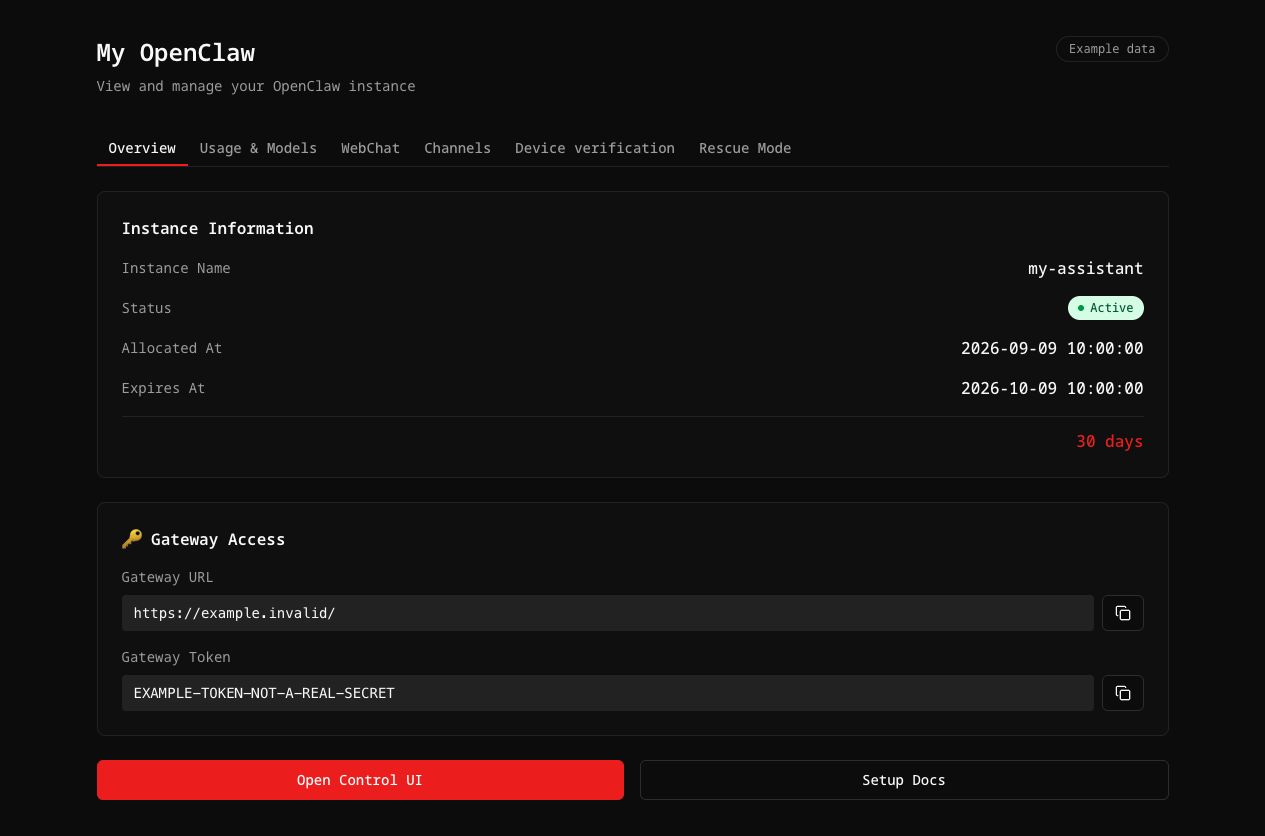 Your OpenClaw dashboard on open-claw.org (example data).
Plans start at $39.90/month with $40 of API credits included, or $23.94/month billed annually. That's less than half the price of the cheapest ChatGPT plan with a Dot. Compare plans, or see what people are building with OpenClaw.
FAQ
What is OpenAI Dots?
Dots are always-on personal AI agents in ChatGPT, announced at OpenAI DevDay on September 29, 2026. Each Dot runs on GPT-6 Astra in its own cloud computer, connects to 4,000+ apps, works in the background and asks for approval before sensitive actions.
How much does OpenAI Dots cost?
Your first Dot is included with ChatGPT Pro (from $100/month) and Business Premium ($125 per seat/month, or $100 billed annually). Extra Dots and more capacity will cost a fixed monthly fee later; prices haven't been announced.
Is OpenAI Dots available in the EU or UK?
Not on ChatGPT Pro. At launch, Pro users in the European Economic Area, the UK and Switzerland are excluded, and Dots are only rolling out in "eligible markets". Users under 18 can't use Dots.
Can a Dot call or text me?
Today you can text or talk to your Dot inside ChatGPT, and reach it in Slack or Microsoft Teams. OpenAI has announced text messages and phone calls as the next channels but hasn't said when they'll reach everyone.
What's the difference between OpenAI Dots and Grok Bot?
Both are always-on agents with a cloud computer. Dots run on GPT-6 Astra, give each Dot its own computer and plug into ChatGPT's 4,000+ apps, Slack and Teams. Grok Bot runs on xAI's models, puts all your bots on one shared computer, and learns tasks by watching you do them once. Dots come with ChatGPT Pro or Business Premium; Grok Bot comes with SuperGrok or Cursor plans.
Why does dot.com go to Grok Bot?
xAI owns the dot.com domain, which changed hands in July, and on the day OpenAI launched Dots it began redirecting to the Grok Bot page. xAI hasn't explained the timing.
Is OpenAI Dots based on OpenClaw?
Not officially. Dots are OpenAI's own closed product. But OpenClaw's creator, Peter Steinberger, joined OpenAI in February 2026, and Dots share OpenClaw's core idea of an always-on agent with its own computer. OpenClaw itself remains open source under an independent foundation.
Can I use GPT-6 Astra without ChatGPT Pro?
Yes. open-claw.org plans include API credits for GPT-6 Astra (as well as Claude Opus 5 and Gemini 3.8 Flash) inside your own hosted OpenClaw, starting at $39.90/month.
Sources
- OpenAI: Introducing dots and Premium seats for ChatGPT Business
- TechCrunch: OpenAI launches Dots, its bubbly agentic avatar and The internet is convinced Elon Musk's xAI trolled OpenAI's Dots launch
- SiliconANGLE: OpenAI launches Dots, always-on AI agents in ChatGPT with their own cloud computers
- Fortune: OpenAI unveils Dots to rival Meta's Muse
- CBS News: Sam Altman unveils "dots," OpenAI's new AI personal agent
- Engadget: Dots are OpenAI's new personal agents
- WinBuzzer: OpenAI rolls out Dots assistants
- xAI: Grok Bot; Unite.AI: xAI launches Grok Bot
- Meta Newsroom: Introducing Muse
- OpenClaw: GitHub repository and docs