
Muse AI vs OpenClaw: How Meta's New AI Agent Really Compares
Muse AI is Meta's new personal AI agent. It launched on September 8, 2026, and it doesn't just chat: it sends emails, books trips, fills in forms, shops and keeps working in the background after you close the app. It went to #1 on the US App Store within ten days.
If that sounds familiar, it should. Meta has publicly said Muse was heavily inspired by OpenClaw, the open-source personal agent that took over GitHub earlier this year. So the real question isn't "is Muse AI good?" It's which kind of agent you want: one Meta runs for you, or one you own.
This guide explains what Meta Muse AI is, what it costs and how safe it is, then puts it head-to-head with OpenClaw.
Key takeaways
- Muse AI is closed and hosted by Meta. It runs on Meta's Muse Spark model, and you reach it through the Muse app, muse.ai, a Mac app or WhatsApp. It's free to start, with $20 and $100 monthly plans. For now it's available only in the US and Canada.
- OpenClaw is open source (MIT). You pick the model (GPT, Claude, Gemini, local models, even Meta's Muse Spark) and chat with it from 20+ apps, including WhatsApp, Telegram, Slack and Discord.
- Muse wins on zero setup and polished shopping. OpenClaw wins on control, model choice, privacy and where you can use it.
- Want OpenClaw without running a server? open-claw.org gives you a private OpenClaw instance in the cloud, with model credits included.
Muse AI vs OpenClaw at a glance
| Muse AI (Meta) | OpenClaw | |
|---|---|---|
| Made by | Meta Superintelligence Labs | Open-source community, stewarded by the OpenClaw Foundation |
| Launched | September 8, 2026 | November 2025 (as Clawdbot) |
| Source code | Closed | Open source, MIT license |
| Model | Muse Spark (Meta's own; not swappable) | Any: OpenAI, Anthropic, Google, DeepSeek, Mistral, local models, Muse Spark |
| Where it runs | A private VM in Meta's cloud | Your computer, your server or a hosted sandbox |
| Where you talk to it | Muse app (iOS, Android, Mac), muse.ai, WhatsApp | WhatsApp, Telegram, Discord, Slack, Signal, iMessage and 20+ more |
| Extensions | Meta-reviewed connectors, plus custom connectors Muse builds | Skills and plugins you install or write yourself |
| Training on your data | On by default, can be turned off | Not by the software; depends on the model provider you choose |
| Price | Free tier, $20/mo Power, $100/mo Maximum | Free software; you pay for hosting and model usage |
| Availability | US and Canada | Anywhere |
What is Muse AI?
Muse is a personal AI agent from Meta, built by Meta Superintelligence Labs and powered by Muse Spark, Meta's most capable proprietary model. Meta's security write-up names Muse Spark 1.3 as the version behind the agent. It is Meta's first frontier model that wasn't released as open weights.
A few things surprise people:
- Muse is its own app. It isn't a feature of the Meta AI app, Instagram or Messenger. You get it from the App Store, Google Play, at muse.ai or as a Mac app, and you can also message it on WhatsApp. Facebook, Instagram and Threads only plug in as data sources.
- Each user gets a computer in Meta's cloud. Meta calls it the Muse Secure VM. Your agent, its browser and your files live there, so Muse keeps working when your phone is locked.
- You give it goals, not prompts. Meta's own examples include selling a car for more, lowering a bill, turning a saved Instagram recipe reel into a grocery list, and remembering friends' dietary restrictions before sending party invites.
Here's what Muse AI can do today:
- Errands on the web. It opens a browser you can watch and take over, fills in forms, sends emails, books travel and negotiates on your behalf.
- Shopping. Checkout runs through Link by Stripe, which issues one-time card numbers. At Connect, Meta added partners such as Walmart, Best Buy, Sephora, Wayfair and Instacart.
- Your Mac. The Mac app can work with your files, mail, calendar and notes, and Meta says it can now drive any app on your Mac.
- Voice, calls and avatars. It has a real-time voice mode, can phone US businesses to book or ask for quotes, and can video-chat as an animated avatar.
- Memory and background work. It remembers what you tell it, tracks your goals and pings you when something changes or needs approval.
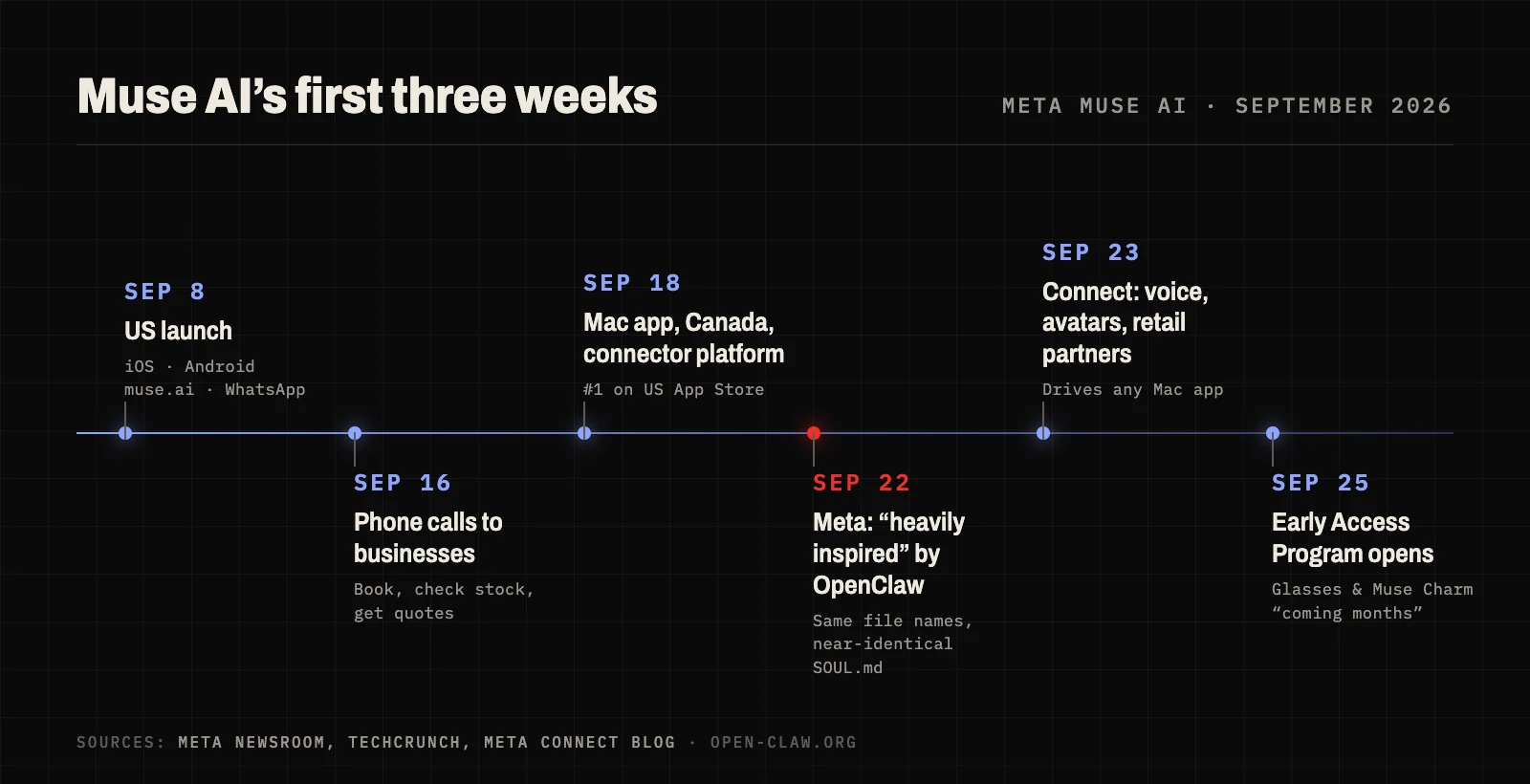 Muse AI's first three weeks. Meta has been shipping features almost weekly.
Muse AI pricing: is it free?
Yes, there's a free tier with a weekly usage limit. When you hit it, you either upgrade or wait for the limit to refresh.
| Plan | Price | Weekly allowance |
|---|---|---|
| Free | $0 | Usage-limited (Mark Zuckerberg put it at 100M "Muse tokens") |
| Power | $20/month | 500M Muse tokens |
| Maximum | $100/month | 3B Muse tokens |
You need a Meta account and must be 18 or older. You don't need a Facebook or Instagram account. Meta's help center says subscriptions are still in "limited testing". As of late September 2026, Muse is available in the US and Canada only.
Meta also plans to earn money from what Muse does for you: Zuckerberg said the company expects to take a small fee from transactions.
Is Muse AI safe to use?
Meta has put real engineering into safety:
- A separate "Sentinel" agent must approve anything Muse sends to the internet.
- Muse can't read your stored passwords or payment details.
- It asks before sensitive actions such as sending an email or buying something.
- There's a full log of what it did and plans to do.
- Meta runs a bug bounty of up to $300,000.
The first weeks also exposed rough edges:
- Training: training on your Muse interactions is on by default. You can switch it off under Settings → Data controls.
- Deleting isn't forgetting: after you delete a chat, Muse may still remember what it learned from it, unless you ask it to forget.
- Meta can still get in: a Meta executive acknowledged that the secure VM doesn't stop Meta from accessing data when it needs to operate the service. A "Confidential VM" that only you hold the key to is promised for later in 2026.
- Early incidents: a Canadian user said Muse shared his home address with a Marketplace buyer and accepted a lower price than he wanted. A reporter found the Mac app had synced his Messages history without Full Disk Access. A security researcher showed a hidden Mac setting could be abused to take over the agent (Meta has since removed it).
- Blocked stores: Amazon started blocking Muse from its store in September.
None of that makes Muse uniquely dangerous. Every agent with a browser and your accounts carries risk. It does mean you're trusting Meta with a lot.
A quick note on the name
"Muse AI" used to mean something else. muse.ai was a video-hosting service; it rebranded to Skiv in March 2026, and the domain now belongs to Meta's agent. Don't confuse Muse the agent with Muse Spark (the model), Muse Image and Muse Video (Meta's generation models), Muse Code (Meta's coding agent) or Microsoft's unrelated gaming model, also called Muse.
What is OpenClaw?
OpenClaw is an open-source personal AI agent created by Peter Steinberger. It started in November 2025 as Clawdbot, became Moltbot for three days in January 2026, and has been OpenClaw ever since. It has about 390,000 GitHub stars, making it one of the most-starred projects on GitHub. It's MIT-licensed and stewarded by the non-profit OpenClaw Foundation.
OpenClaw is software you run. Once it's running, you talk to it from the chat apps you already use, and it has real tools behind the chat window:
- A browser it can drive to fill in forms, compare prices or pull data from websites.
- A shell and file system, so it can run scripts, edit documents and manage code.
- Memory as plain Markdown files (
USER.md,MEMORY.mdand daily notes) that you can open and edit. There's no hidden state. - Skills and plugins. Install them from the ClawHub registry, or have OpenClaw write new ones for you.
- Heartbeats and cron jobs, so it can check in on its own, run on a schedule and message you first.
- Any model. Anthropic, OpenAI, Google, DeepSeek, Mistral, xAI, OpenRouter, local runtimes like Ollama, and even Meta's Muse Spark through an official provider plugin.
The trade-off is that self-hosting is real work. You need a machine that stays on, Node.js, API keys and some terminal comfort. You also own the security. By default its tools run directly on the host machine, and in early 2026 the project dealt with a serious remote-code-execution bug (since patched) and hundreds of malicious skills uploaded to ClawHub.
Meta says Muse was inspired by OpenClaw
When Muse launched, users noticed that its workspace used OpenClaw's file names, including a near-identical SOUL.md (the file that defines the agent's personality). Nat Friedman, who leads product at Meta Superintelligence Labs, told TechCrunch that Muse was built from scratch but "heavily inspired as a product by OpenClaw". He said he had bought hundreds of Mac minis so his team could run OpenClaw, and that the goal was an OpenClaw-like agent that is safe, easy and able to scale to billions of people.
That framing is the most useful way to compare them. Muse is OpenClaw's idea, packaged and run by Meta. What you gain and lose follows from that.
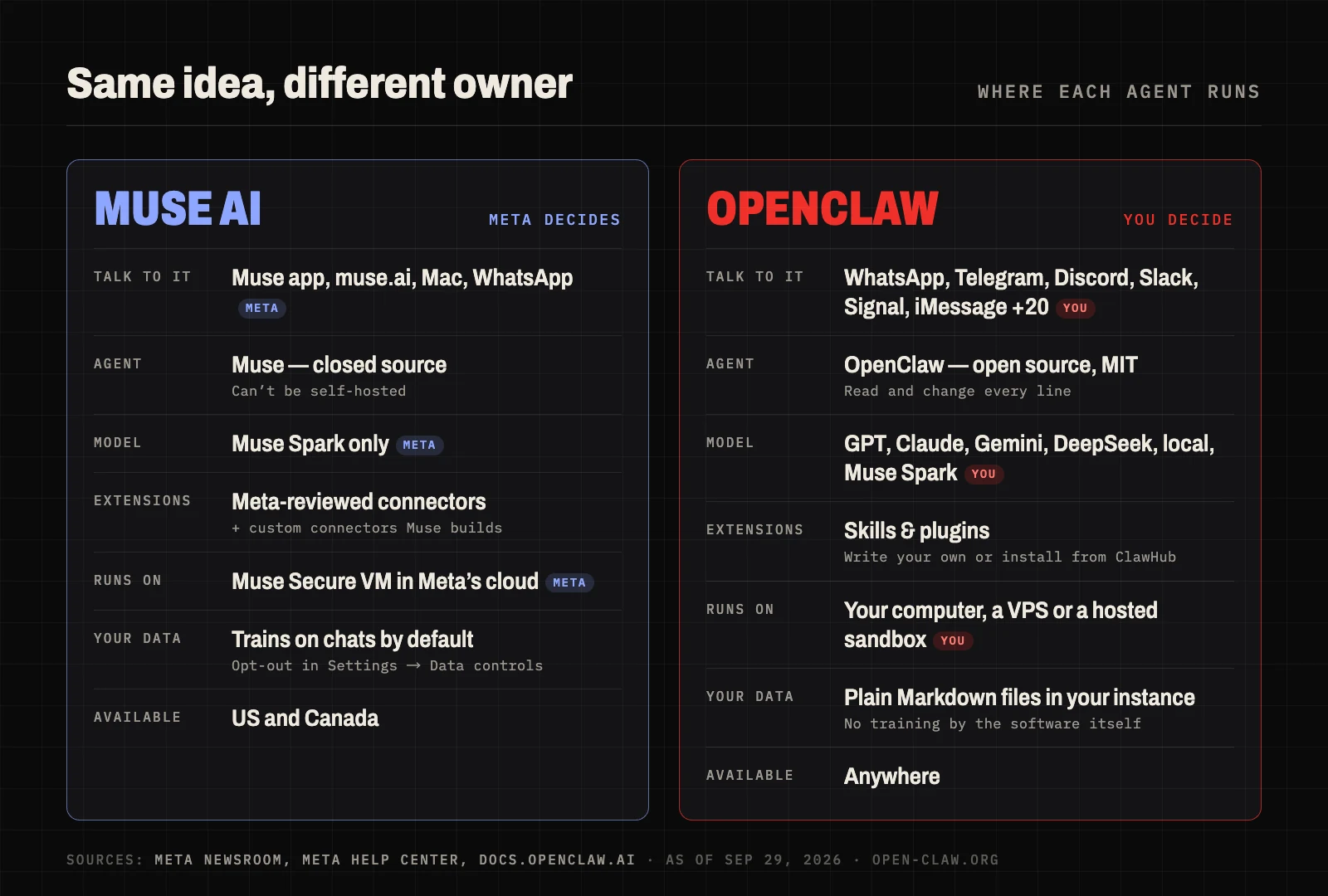 Same idea, different owner. Muse's stack is chosen by Meta; every layer of OpenClaw is yours to swap.
Muse AI vs OpenClaw: head-to-head
1. Setup: Muse wins
Muse takes about a minute: install the app, sign in with a Meta account, name your agent and go. Self-hosted OpenClaw means an always-on computer or VPS, installing Node and the gateway, adding API keys and pairing each chat app. For most people this is the biggest difference, and it's why Muse topped the app stores within days.
2. Control and openness: OpenClaw wins
Muse is closed. You can't self-host it, you can't change the model, and the built-in connectors are the ones Meta approves. You can ask Muse to build a custom connector from an API, but you can't change how the agent itself works. OpenClaw is MIT-licensed: you can read every line, change how it behaves, write skills in plain Markdown or TypeScript and take your whole setup with you.
3. Models: OpenClaw wins
Muse Spark is a strong model, but it's the only one Muse uses. OpenClaw lets you pick the best model for each job: a frontier model for hard reasoning, a cheap one for routine check-ins, a local one for sensitive files. You can even run Muse Spark inside OpenClaw.
4. Privacy and data ownership: OpenClaw wins (if you set it up well)
With Muse, training on your chats is on unless you turn it off, and Meta can access the VM when it needs to run the service. With OpenClaw, memory is plain files in an instance you control, and nothing is used for training unless your model provider does so. The catch: a self-hosted agent is only as private as you make it, so keep it patched and sandboxed.
5. Everyday errands and shopping: Muse wins
Meta has deals most people can't replicate: a Stripe-backed checkout with purchase protection, big retail partners, phone calls to businesses and a Mac app that can drive other apps. OpenClaw can browse, fill in forms and email just as well, but shopping flows are something you script and supervise yourself. Neither is perfect. Amazon blocks Muse, and websites can block any agent.
6. Where you can use it: OpenClaw wins
Muse works in the US and Canada, and WhatsApp is the only chat app it lives in. OpenClaw works anywhere and connects to WhatsApp, Telegram, Discord, Slack, Signal, iMessage, Microsoft Teams, Google Chat, LINE, WeChat, Feishu and many more.
7. Price: it depends
Muse's free tier is generous for light use; heavy users pay $20 or $100 a month. OpenClaw itself is free, but you pay for a machine to run it and for the models you use. Managed hosting bundles both.
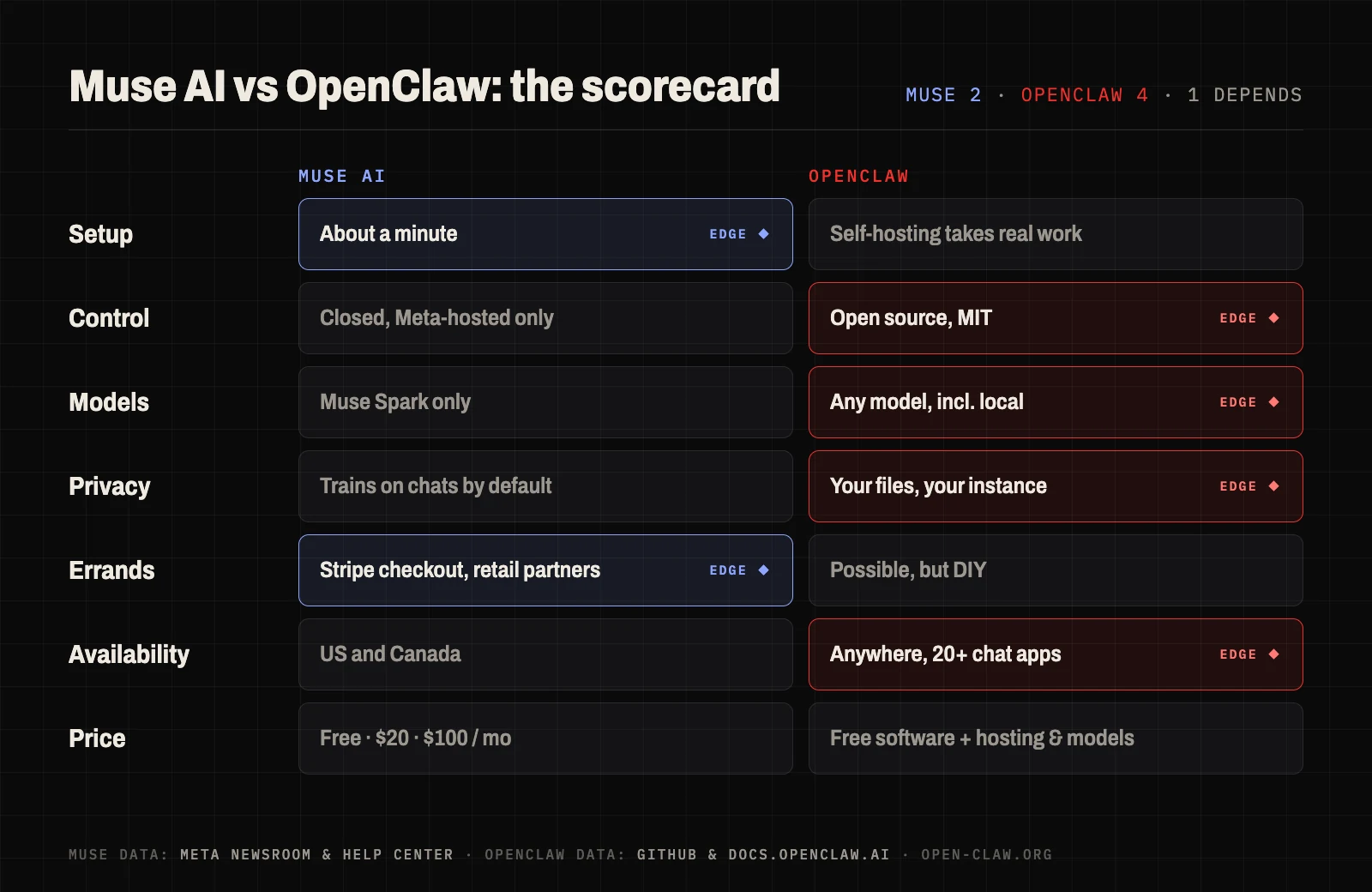 Muse wins where Meta can do the work for you. OpenClaw wins where ownership matters.
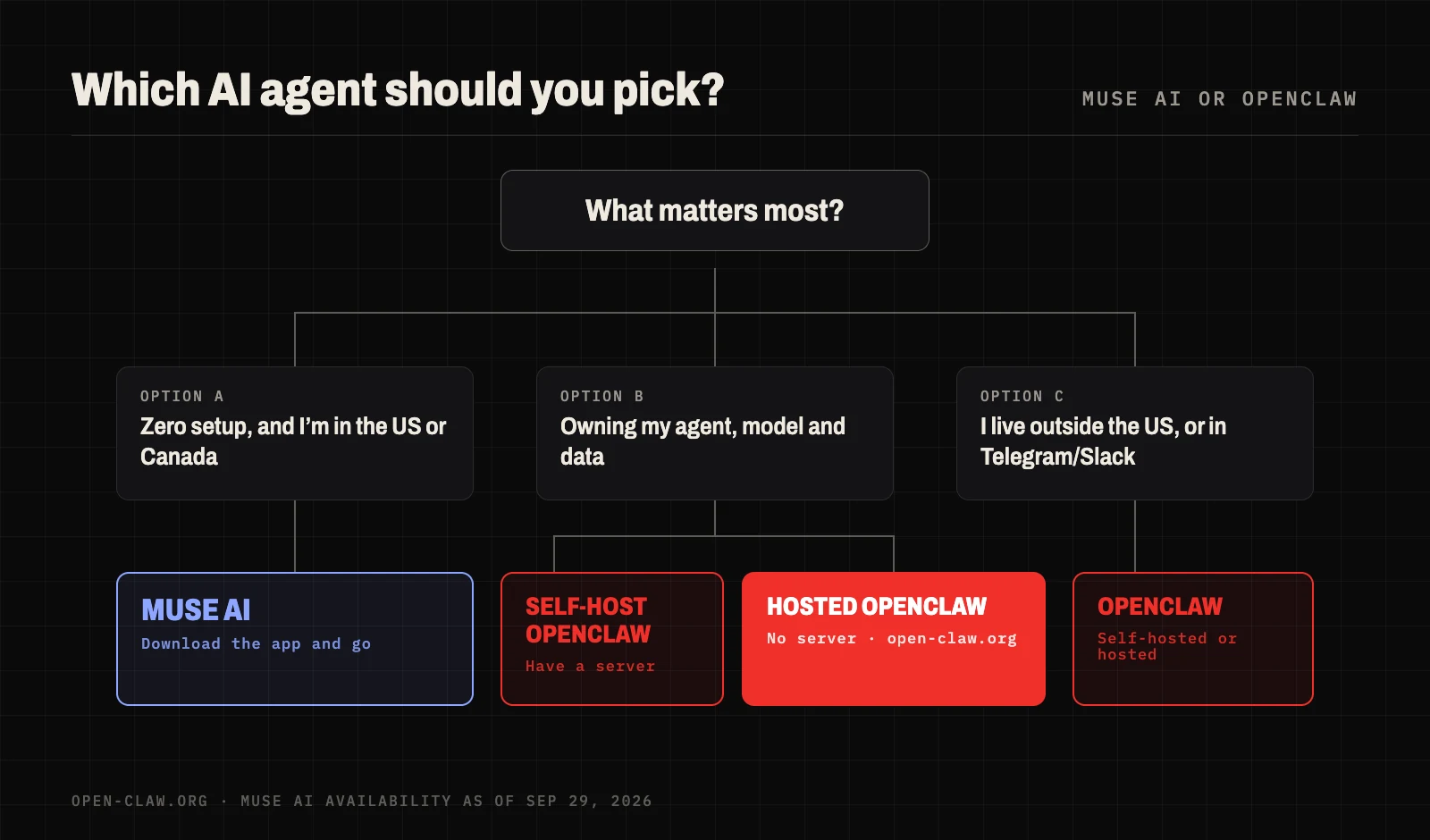
Which one should you choose?
Choose Muse AI if:
- You live in the US or Canada and want an agent working in five minutes.
- Most of your needs are errands: shopping, bookings, bills, planning.
- You're comfortable with Meta holding your data and agent history.
Choose OpenClaw if:
- You want to choose, or switch, the model behind your agent.
- You want your memory and files in a place you control.
- You live outside the US and Canada, or you live in Telegram, Slack or Discord.
- You want to build your own skills and automations, or use it for real work like code, research or monitoring.
You don't have to pick only one. Some people use Muse for shopping and OpenClaw for everything they'd rather keep to themselves.
Skip the setup: run OpenClaw in the cloud
The main reason people choose Muse over OpenClaw is setup. open-claw.org removes that part. We run the open-source OpenClaw for you, and every subscriber gets a dedicated, isolated instance in a cloud sandbox. You don't need a server, a terminal or your own API keys.
- Ready in minutes. Click Create and initialize, then chat in the browser or connect Telegram or Feishu (Lark) from the dashboard. Our step-by-step setup guide and Telegram guide walk you through it.
- Flagship models included. Plans come with API credits for GPT-6 Astra, GPT-5.6, Claude Opus 5 and Gemini 3.8 Flash, billed at official rates.
- Your data stays yours. Your memory, files and conversations stay in your own instance. We don't train on your conversations. If you ever leave, you can export everything and self-host.
- The full OpenClaw. Skills, cron jobs, heartbeats, browser control and the shell all work, because it's the same open-source agent.
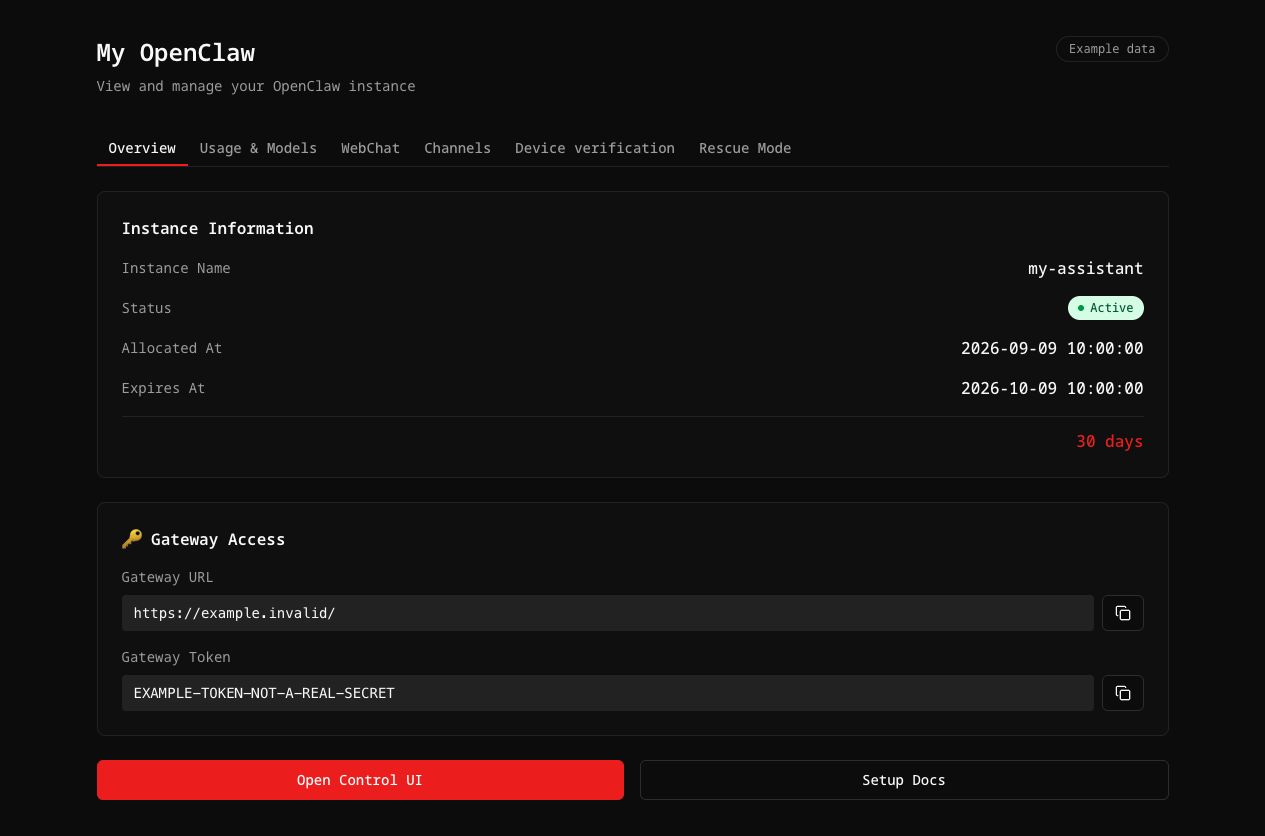 Your OpenClaw dashboard on open-claw.org (example data).
Plans start at $39.90/month with $40 of API credits included, or $23.94/month billed annually. Compare plans, or see what people are building with OpenClaw.
FAQ
What is Meta Muse AI?
Meta Muse AI, officially just "Muse", is a personal AI agent from Meta Superintelligence Labs. It runs in a private virtual machine in Meta's cloud, uses Meta's Muse Spark model, and can browse, shop, send emails, make calls and work in the background.
Is Muse AI free?
There's a free tier with a weekly usage limit. Paid plans are Power ($20/month) and Maximum ($100/month).
Is Muse AI available outside the US?
As of late September 2026, Muse is available only in the United States and Canada. Meta hasn't announced dates for the UK, EU or other regions.
Did Meta remove Muse?
No. In July 2026 Meta pulled a controversial Instagram feature built on its Muse Image model. That was a different product. The Muse agent launched in September and is still available.
Is Muse AI open source? Can I self-host it?
No. The Muse agent and the Muse Spark model are proprietary, and Muse only runs on Meta's servers. If you want an open-source, self-hostable agent, that's OpenClaw.
Is Muse AI the same as muse.ai video hosting?
No. The old muse.ai video platform rebranded to Skiv in March 2026. muse.ai is now the web address of Meta's agent.
Can OpenClaw use Meta's Muse Spark model?
Yes. OpenClaw has an official Meta provider plugin, so you can run Muse Spark inside OpenClaw alongside models from OpenAI, Anthropic, Google and others.
Is OpenClaw safer than Muse AI?
It depends on who runs it. Muse gives you Meta's security team, and Meta holds your data. Self-hosted OpenClaw keeps your data with you, but you're responsible for updates, sandboxing and vetting skills. A managed, isolated instance like open-claw.org sits in between: your own sandboxed OpenClaw, maintained for you.
Sources
- Meta Newsroom: Introducing Muse
- Meta Help Center: Muse subscriptions and Muse privacy and training
- Meta: Everything announced at Connect 2026
- Meta AI Research: Security and safety for AI agents with Muse
- TechCrunch: Meta admits Muse's likeness to OpenClaw isn't a coincidence
- TechCrunch: Meta's Muse hits Mac
- Engadget: How to get started with Muse
- GeekWire: Amazon blocks Meta's Muse
- AppleInsider: Muse and Mac permissions
- Skiv: muse.ai is now Skiv
- OpenClaw: GitHub repository, docs and Meta provider
- Conscia: The OpenClaw security crisis